
Most people use the Chrome browser to access the internet, but now is the perfect time to switch to a native browser. Zoho’s Ulaa browser has many features that will leave you stunned.
Since the launch of the indigenous messaging app Arattai, other Zoho apps have also gained attention. Among the many powerful apps from Zoho, the Ulaa browser can prove to be very useful for the average user. You can use it on your phone, tablet, or PC. Discovering some of the amazing features of the Ulaa browser, which is different from Google Chrome, will make it your default browser. So, get ready to be amazed.
Built-in ad blocker

You get an in-built ad blocker in the Ulaa browser. With its help, you do not see annoying advertisements on different websites. This not only improves the browsing experience but also makes the web pages load faster. However, if you want to use such a feature in the Chrome browser, then you have to install a separate extension. It has been claimed in many reports that browsers that do not show advertisements are 20-30% faster than normal browsers. This is the reason why the Ulaa browser is much better than the Chrome browser in speed and experience.
By visiting the website of the Ulaa browser, you can easily understand that our indigenous browser gives a lot of importance to privacy. Actually, Zoho clearly claims that this browser neither tracks nor sells user data. This simply means that the information about your online activity does not go to any third party. Whereas the business model of the Chrome browser is based on advertisements and tracking user behaviour. For this, Chrome browser collects data from your search, website visits and click patterns so that personalised advertisements can be shown to you. If you care about your privacy, then you can shift to the Ulaa browser.
Another special feature of the Ulaa browser is that it offers different modes like Work Mode, Personal Mode, Kids Mode, and Developer Mode. It should be noted that all these modes come with different privacy settings and content filters. For example, adult content is blocked in Kids Mode. Similarly, many extensions and tools are available for developers in Developer Mode. In the Chrome browser, you get the option to use multiple profiles, but they do not have different settings or features.
Super fast performance

Ulaa is a lightweight browser and uses less CPU and RAM due to features like an ad-blocker and tracking prevention in its core design. Even if you use this browser on an old or low configuration system, web pages load faster, and there is less chance of hanging. The biggest criticism of the Google Chrome browser has been that it uses too much RAM. In such a situation, to use superfast internet, you can shift from Chrome to the indigenous Ulaa browser.
Easy to use
The overall interface of the Ulaa browser is very easy to use. The app’s bookmarking system is also very simple. The management of websites also feels streamlined, making it easy to access any site whenever needed. While Chrome offers a bookmark bar and syncing, its design doesn’t feel as user-friendly. Ulaa’s bookmarking interface, on the other hand, is quite organized.
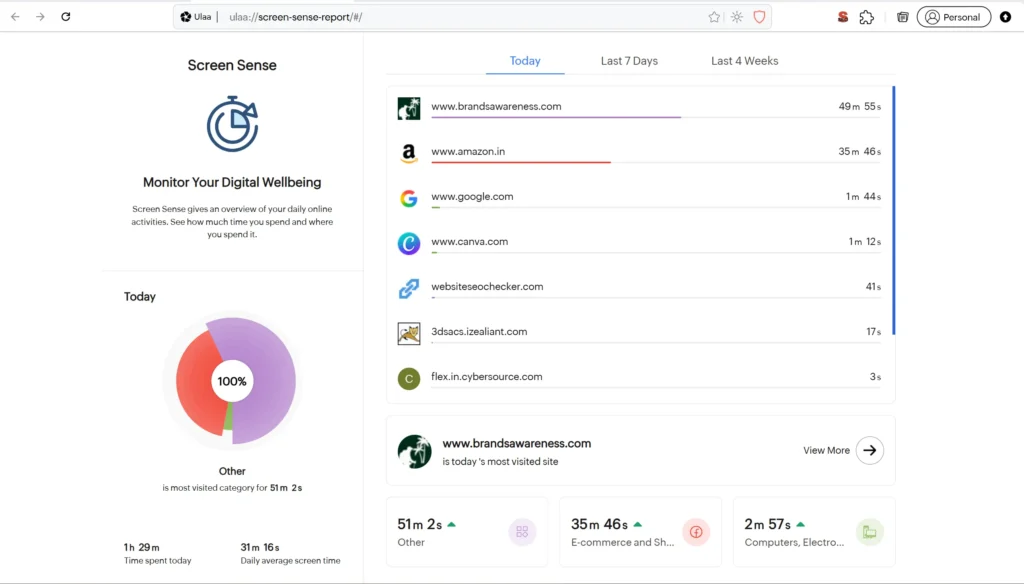
Screen Sense
Ulaa tracking your daily use on each website. You can check and track spend time on Ulaa browser. it can be check monthly, weekly and daily basis.